
Choosing gear is really about removing barriers to the experience that you want to have while playing. It really is that simple.
In this article I take you through my thought process and the rationale behind my recent purchase of a set of Pioneer XDJ-1000 MK2 players for my home studio.
I know this player might not be for everyone, but the intention here is to guide you through how I arrived at a decision – by staying focussed on what is important, starting with the use case and honing in on the key features that I need as a DJ.
Use Case
I’m a professional DJ and I needed a set of digital players for home that will pair with my turntables as well as something I can put in a DJ coffin and take to gigs.
Removing variation in the playing environment was also a consideration. The goal here was for the player to closely match what I might receive at a nightclub, a bar or on a stage at a festival, be portable and hit a reasonable price point.
Why Pioneer? I stick to the Pioneer media players as they are the industry standard and I organise all my music through the RekordBox software. I understand some will feel this is dismissive of Denon’s players. I’m not a hater! My first CDJ was a Denon DN-S5000 and I know they have come a long way from that.

I used to use Serato and turntables to play digital files, but I’ve come to enjoy playing digital files on CDJs more than using a laptop with Serato as I find the laptop to be a major distraction and my DJ style has shifted away from turntablism, despite occasionally scratching/back spinning and mashing up vocals in the mix.
In A Nutshell – Why the XDJ-1000?
- It has the all important full sized jog wheel that hasn’t really changed since the CDJ-1000 MK3 (there’s a reason this has never changed)
- Same 7” screen as the CDJ-2000 NXS2 (I go into more detail about why this is good)
- It plays high quality digital files (MP3/AAC/AIFF/FLAC/ALAC)
- XDJ-1000s are light to carry (3.7 kg) as they don’t have metal face plates or a CD player inside them.
- It is a current production model and therefore receives support from Pioneer for firmware updates.
- The simplified layout keeps the focus on the most important functions: track selection, tagging, looping, tempo/pitch, break start/stop and slip/reverse.


Setup wise I wanted to pair them with my own DJ mixer. I recently upgraded from my old battle-worn DJM-800 (the second mixer I bought more than 10 years ago) to the analogue Allen & Heath Xone92. This means that I need stand-alone media players and my choice was narrowed to the pioneer CDJ/XDJ line.
What Matters
I need the standard size CDJ Jog Wheel because scratching on anything smaller just doesn’t work and anything larger is heavy and less portable.
The XDJ-1000 has the same 7” screen as the 2000 NXS2. Why does this matter?
This is essentially the same visual system as the CDJ-2000 NXS2. The major difference is that all the hot cues and beat skipping functions are available on through the ‘performance mode’ tab. It’s fast to use and easy to operate.
The search behaviour is very similar to the CDJ-2000 NXS2. When searching for tracks manually – speed matters. In the heat of the moment you want the fastest route to the track you’re trying to find and the QWERTY keyboard search is often how I get there. For me, this was a game changing feature that always used to be so annoying about using the old CDJ-2000 NEXUS (version 1) and CDJ-900 in the clubs. It used to be an A-Z touch bar that was a time pit to use.
Looping is arguably the most important feature a DJ deck has and the XDJ-1000 MK2 looping behaviour is very similar to the CDJ-2000 NXS2. Loops are controlled in much the same way. Main differences here are that the max automatic loop on the XDJ-1000 is 16 bars and the max beat skip is 4 beats. The CDJ-2000 NXS2 can skip 16 beats and loop up to 32 beats. I rarely engage a 32 bar loop.
What About The Other CDJs
CDJ-2000 NXS2 prices are still a bit high in the resale market and they are not in production anymore – but that would have been the ideal player for my home setup. It is the pinnacle of CDJ/USB players. As far as I’m concerned no company has improved on the CDJ-2000 NXS2 (not even pioneer, but i’ll explain later).
CDJ-900 NXS2 are almost non-existent in clubs and bars and they don’t have hot cues and the search function is not based on an on screen QWERTY keyboard.
Note. It’s worth mentioning that the Digital to Analogue Conversion (DAC) in the XDJ-1000 MK2 is not the same as the CDJ-2000 NXS2. When comparing the specifications sheets you will see that the CDJ-2000 NXS2 has lower distortion value (< 0.0018 %) compared to XDJ-1000 MK2 (< 0.01 %). Also the power supply on for analogue audio circuit is fully separate from the digital circuit.
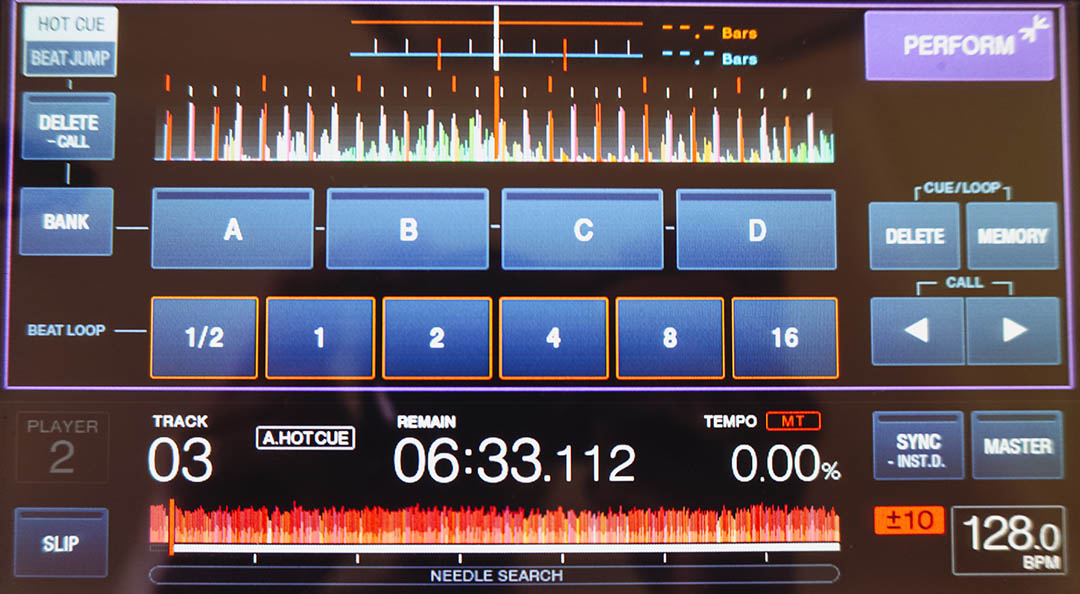
For me the biggest downside about the XDJ-1000 is that Hot Cues are played using the touch screen. However, with a bit of practice I think you can still nail your Hot Cues all the same, but tactility is really important in DJing – it’s what connects your fingers to the music and would have been nice to have some hot cue buttons on the face plate for increased tactility.
Final Thoughts
When I play, I want the equipment to dissolve and my connection to the music and the audience to be the most important thing – not be arrested by a massive screen in front of me. If there is a big screen you will look at it.
Watch DJs play on Serato/Traktor with their eyes pinned to the parallel view of the waveforms lining up. Initially it’s helpful, but it soon becomes a barrier to higher levels of performance in my opinion – because your eyes leave the room.
I believe that the higher levels of DJing are in emotional connection – not technical perfection. The XDJ-1000 strikes a balance that satisfies my use case, budget and needs as a professional DJ.
See the full specs on the Pioneer website